

WindFarmNetwork/Router
This notebook is a practical guide to OptiWindNet’s Network/Router API (i.e. high-level API). It covers creating a wind farm model, using different routers (EWRouter, HGSRouter, MILPRouter), and applying key WindFarmNetwork functionalities. Specifically, we will:
Explore the
WindFarmNetworkclassCompare available routers and their use cases
Run a complete optimization example
✅ WindFarmNetwork
The WindFarmNetwork class is the central user-facing component in the OptiWindNet Network/Router-API. It is flexible and extensible, supporting multiple input formats and routers (electrical network optimizers), and is used to model and optimize the electrical network of a wind farm.
To create a WindFarmNetwork instance:
Required:
Turbine and substation coordinates (see Data Input for formats)
Cable data (capacities and costs, or at least maximum capacity as a single number)
Optional:
Borders and obstacles: to add spatial constraints
Router: optimization strategy (defaults to
EWRouterif not specified)verbose: log/hide logging messages (default to
Fault).
Key Responsibilities
Feature |
Description |
|---|---|
Initialization & Parsing |
Accepts turbine/substation coordinates or the Location geometry |
Optimization |
Interfaces smoothly with different routers ( |
Visualization |
Provides plotting functions for location geometry, links, mesh, and the optimized network. |
Gradient & Update Graph |
Computes gradients for optimization and allows updating the electrical network using a compact “terse link” format. |
Example Workflow
# Initialize with coordinates and cable types
wfn = WindFarmNetwork(
    cables=[(2, 1500.0), (5, 1800.0)],
    turbinesC=...,
    substationsC=...,
)

# Optimize electrical network using the default router (EWRouter)
wfn.optimize()

# Access total cost or cable length
total_cost = wfn.cost()
total_length = wfn.length()

# Visualize network
wfn.plot() # or simply wfn if you are running on notebooks
🧭 Router
In OptiWindNet, a Router is used to compute the optimal network (cable routing) of the wind farm’s electrical network. Given turbine and substation positions (layout), available cable options, and routing constraints, a router determines which turbines connect to which substations and how cables should be laid to minimize length (and consequently cost).
Currently Available Routers
The routers currently included in the optiwindnet.api module are:
EWRouter
Fastest option — completes in a fraction of a second
Great for quick network generation
Produces only branched-topology solutions
Heuristic method (EW = modified Esau-Williams) — solutions may be far from the optimum
HGSRouter
Still fast — can provide high-quality solutions in 0.5–2 seconds
Produces only radial-topology solutions (no branching)
A maximum number of feeders can be enforced
Meta-heuristic method (HGS = Hybrid Genetic Search)
MILPRouter
Delivers solutions with quality guarantees (a bound on the distance from the optimum)
May take a few to several minutes depending on the problem size and quality required
Full set of model options to choose from
Should be used when optimality is more important than speed
MILP = Mixed Integer Linear Programming
Run an example
In this section we will:
Create a simple wind farm network
Use heuristic and MILP optimization
Explore key methods such as:
.optimize().plot().cost(),.length().terse_links(),.update_from_terse_links().gradient().get_network().add_buffer()
Create a WindFarmNetwork instance
Import required modules
[1]:
import numpy as np
from optiwindnet.api import WindFarmNetwork, EWRouter, MILPRouter, ModelOptions
[2]:
# Display figures as SVG in Jupyter notebooks
%config InlineBackend.figure_formats = ['svg']
Load location data
OptiWindNet operates on location geometries, which define turbine and substation positions (plus optional borders/obstacles).
You can load a location from:
.yamlor.osm.pbffiles;The included locations repository;
Your own coordinate arrays.
For more details see Data Input.
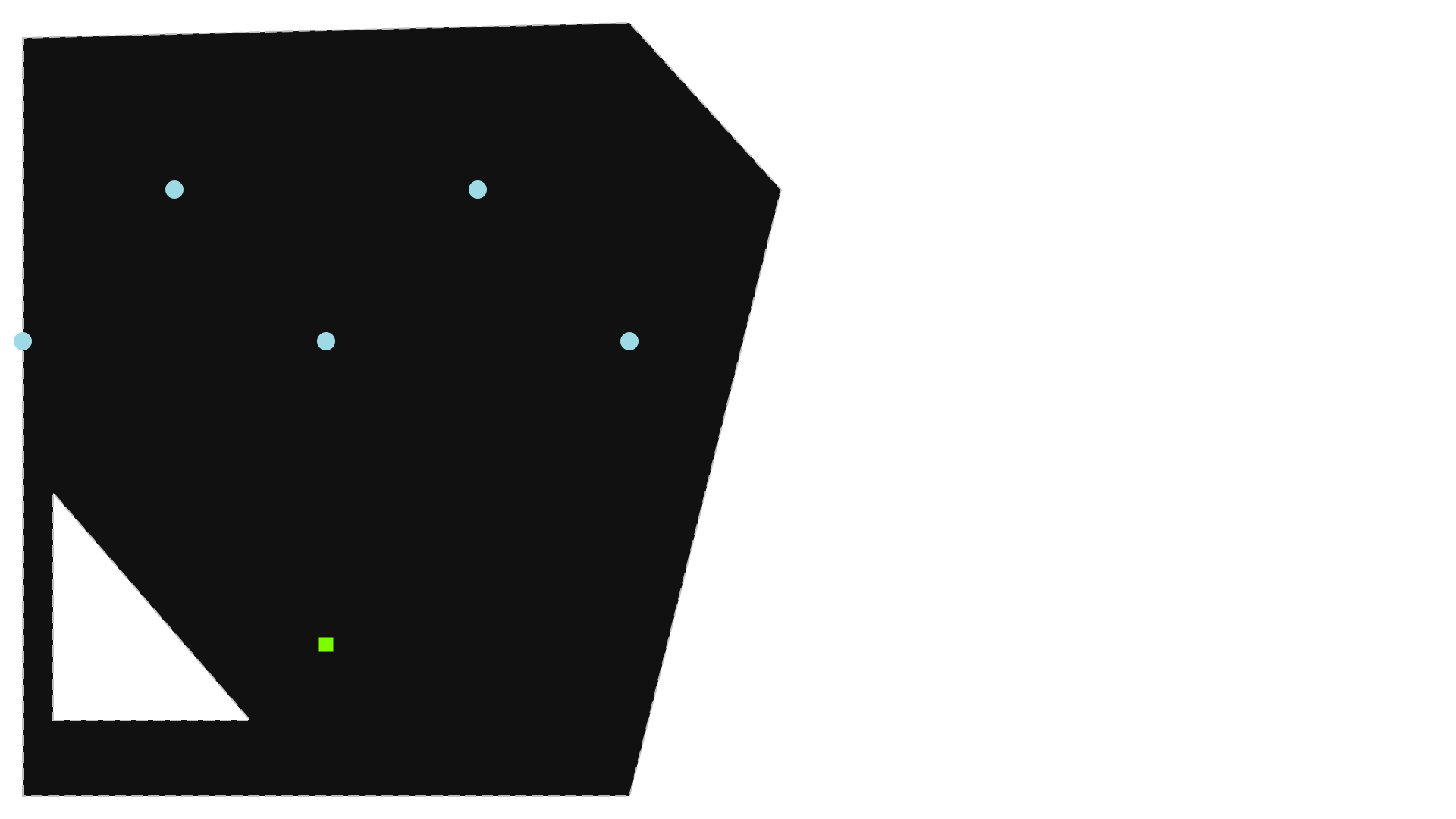
We start with a simple geometry (5 turbines and 1 substation), and define a simple set of cables.
[3]:
wfn = WindFarmNetwork(
    cables=[(2, 1500.0), (5, 1800.0)],
    turbinesC=np.array([[0, 0], [1, 1], [2, 0], [3, 1], [4, 0]]),
    substationsC=np.array([[2, -2]]),
    borderC=np.array([[0, -3], [0, 2], [4, 2.1], [5, 1], [4, -3]]),
    obstacleC_=[np.array([[0.2, -2.5], [1.5, -2.5], [0.2, -1]])]
)
Plot location
Note: Many of the Jupyter notebooks provided include SVG figures as output. To ensure these visuals are displayed correctly in JupyterLab or Jupyter Notebook, make sure the notebook is marked as trusted. In JupyterLab, you can do this by pressing
Ctrl + Shift + Cand selecting Trust Notebook.
[4]:
wfn
[4]:
Method: optimize(router=...)
This is the main method that optimizes the electrical network using the given router (heuristic, metaheuristic or MILP). > Note that the router could be passed directly to WindFarmNetwork(router=...).
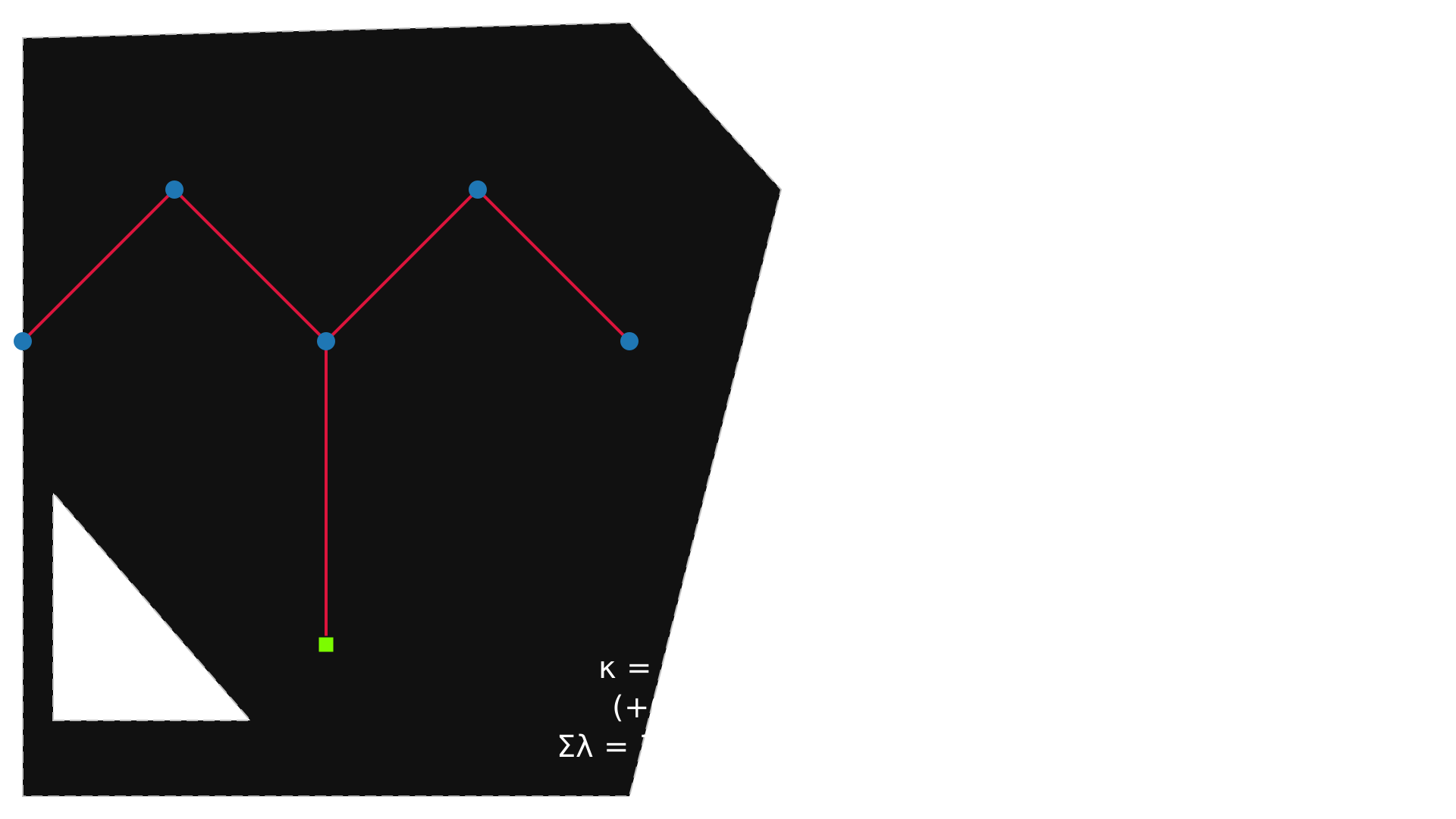
Use a heuristic router (Esau-Williams)
[5]:
wfn.optimize(router=EWRouter())
[5]:
array([ 1, 2, -1, 2, 3])
Plot the result
[6]:
wfn
[6]:
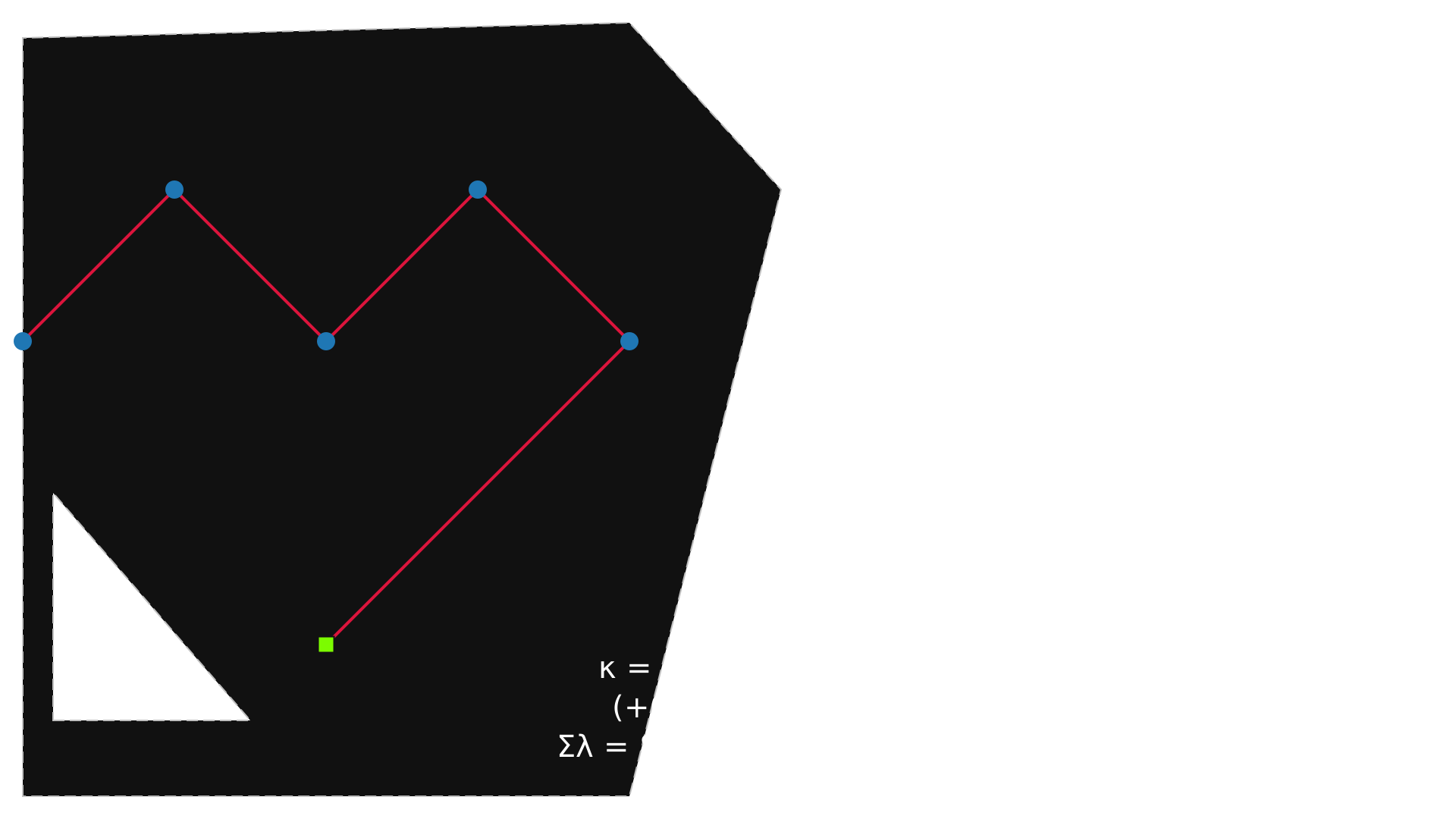
Use a MILP router with full control over topology and feeders
The solution from the previous call to wfn.optimize() is stored within the wfn object. If this solution is feasible under the current ``MILPRouter`` settings, it will be automatically used as a warm start. Otherwise, if it does not meet the current ModelOptions constraints, it will be ignored, and the MILP solver will start from scratch.
[7]:
model_opts = ModelOptions(
    topology='radial',
    feeder_limit='minimum',
    feeder_route='straight',
)
wfn.optimize(
    router=MILPRouter(
        solver_name='ortools',
        time_limit=2,
        mip_gap=0.01,
        model_options=model_opts
    ),
    verbose=True,
)
wfn
Warning: No warmstarting (even though a solution is available) due to the following reason(s):
    - branched network incompatible with model option: topology="radial"
[7]:
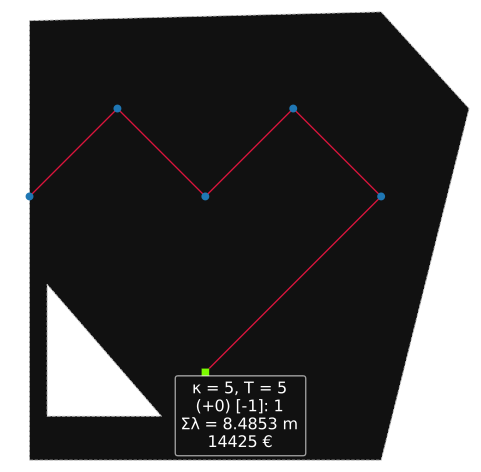
Method: plot() and Variants
These methods help you visualize different stages of the optimization:
plot_location(): plot turbine/substation coordinates and bordersplot(): plot optimized electrical network
For more details, see the Plotting tutorial.
[8]:
wfn.plot_location()
wfn.plot() # wfn will do the same on notebooks (and if no G is available it will display L)
[8]:
<Axes: >
Method: cost() and length()
Returns the total cost and cable length of the optimized network.
[9]:
print("Network cost:", wfn.cost())
print("Network length:", wfn.length())
Network cost: 14424.97833620557
Network length: 8.485281374238571
Method: terse_links()
A terse link is a compact way to describe how each turbine is connected in the electrical network. It’s just a list (or array) where:
Each position
irepresents turbineiThe value at position
iis the node that turbineiconnects to (this could be another turbine or a substation)
[10]:
terse = wfn.terse_links()
print("Terse link array:", terse)
Terse link array: [ 1 2 3 4 -1]
Method: update_from_terse_links()
update_from_terse_links() allows you to reconstruct the network from a known terse_link, optionally updating coordinates. This method assumes a valid and feasible network, so it’s your responsibility to ensure that:
The connections form a proper feeder tree
Every turbine is (indirectly or directly) connected to a substation
Capacity constraints are not violated
Suppose we have a wind farm with:
5 turbines → nodes
0, 1, 2, 3, 41 substation → node
-1(Note: In OptiWindNet, substations are assigned negative indices)
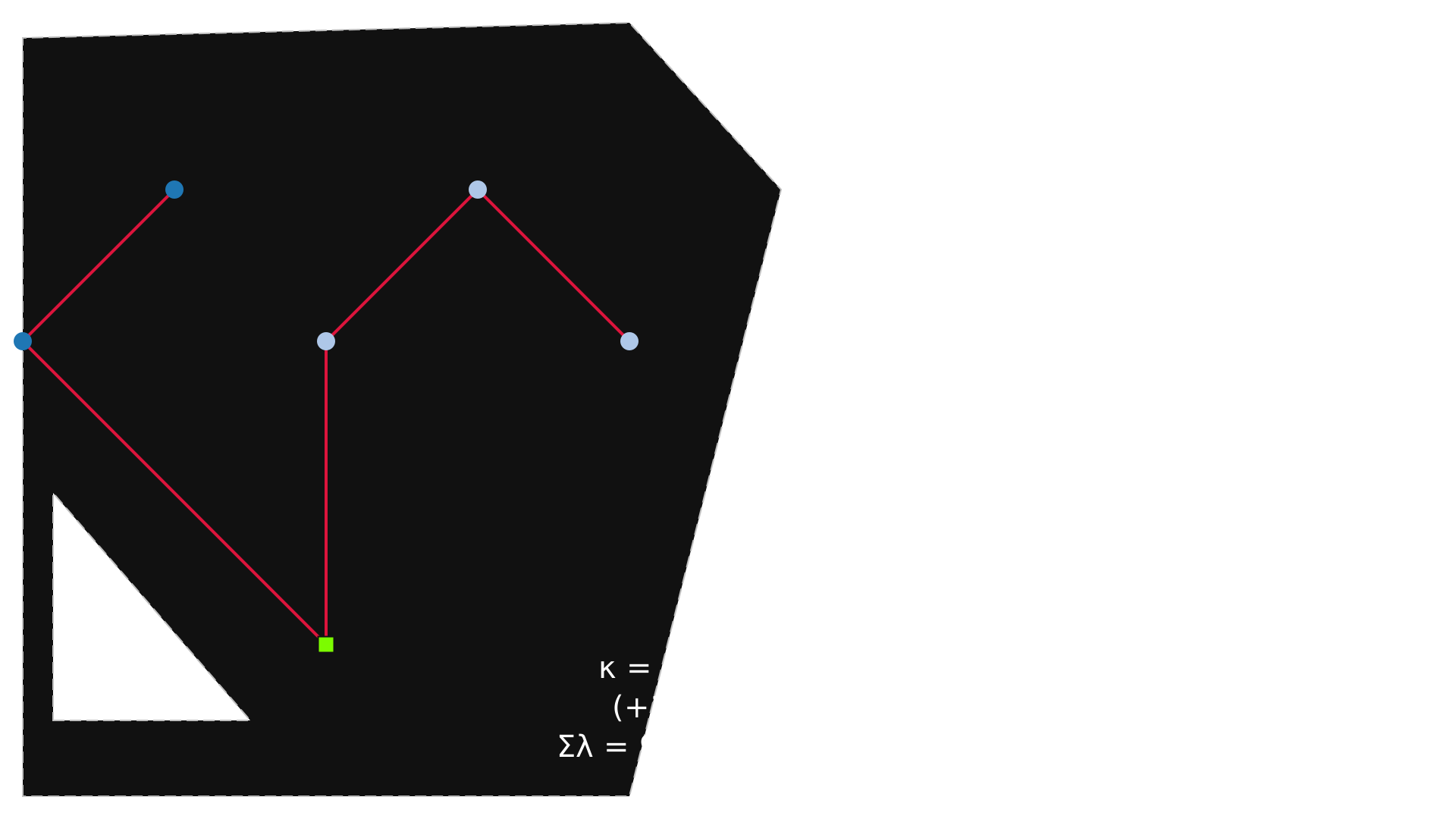
We want the following connections:
Turbine 0 → Substation (-1)
Turbine 1 → Turbine 0
Turbine 2 → Substation (-1)
Turbine 3 → Turbine 2
Turbine 4 → Turbine 3
This gives us the terse_links array:
```python terse_links = [-1, 0, -1, 2, 3]
[11]:
new_terse_links = np.array([-1, 0, -1, 2, 3])

# Apply the new configuration
wfn.update_from_terse_links(new_terse_links)

# Visualize the updated network (cable routing)
wfn
[11]:
Method: gradient()
This method computes the gradient of the cost or length with respect to turbine/substation positions. Useful for hybrid optimization or sensitivity analysis. > Note: default of gradient_type is length.
[12]:
print('--- gradient_type=length ---\n')
grad_turb, grad_subs = wfn.gradient()
print("Gradient (w.r.t. turbines):\n", grad_turb, "\n")
print("Gradient (w.r.t. substations):\n", grad_subs)
print('\n')
print('--- gradient_type=length ---\n')
grad_turb, grad_subs = wfn.gradient(gradient_type='cost')
print("Gradient (w.r.t. turbines):\n", grad_turb, "\n")
print("Gradient (w.r.t. substations):\n", grad_subs)
--- gradient_type=length ---

Gradient (w.r.t. turbines):
 [[-1.41421356  0.        ]
 [ 0.70710678  0.70710678]
 [-0.70710678  0.29289322]
 [ 0.          1.41421356]
 [ 0.70710678 -0.70710678]]

Gradient (w.r.t. substations):
 [[ 0.70710678 -1.70710678]]


--- gradient_type=length ---

Gradient (w.r.t. turbines):
 [[-2121.32034356     0.        ]
 [ 1060.66017178  1060.66017178]
 [-1060.66017178   739.33982822]
 [    0.          2121.32034356]
 [ 1060.66017178 -1060.66017178]]

Gradient (w.r.t. substations):
 [[ 1060.66017178 -2860.66017178]]
Method: get_network()
This method returns the final optimized network as a structured NumPy array, where each row represents an edge in the network.
Each edge includes detailed attributes such as:
``src``: index of the source node
``tgt``: index of the target (destination node)
``length``: physical cable length
``load``: electrical load carried through the cable (number of turbines)
``cable``: index of the cable type used (e.g., 0 for first type in cable list)
``cost``: cost associated with the used cable (if cost is provided by the user)
[13]:
network_data = wfn.get_network()
network_data[:2]  # preview only first few edges
[13]:
array([(1,  0, 1.41421356, 1., 0), (0, -1, 2.82842712, 2., 0)],
      dtype=[('src', '<i8'), ('tgt', '<i8'), ('length', '<f8'), ('load', '<f8'), ('cable', '<i8')])
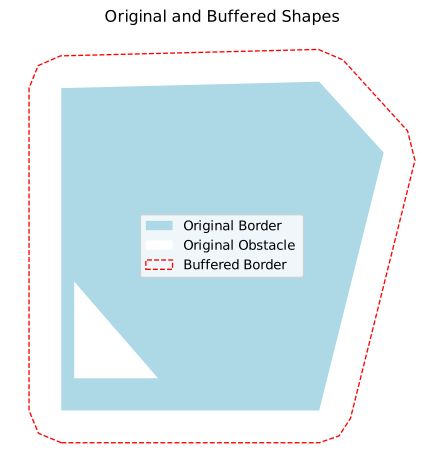
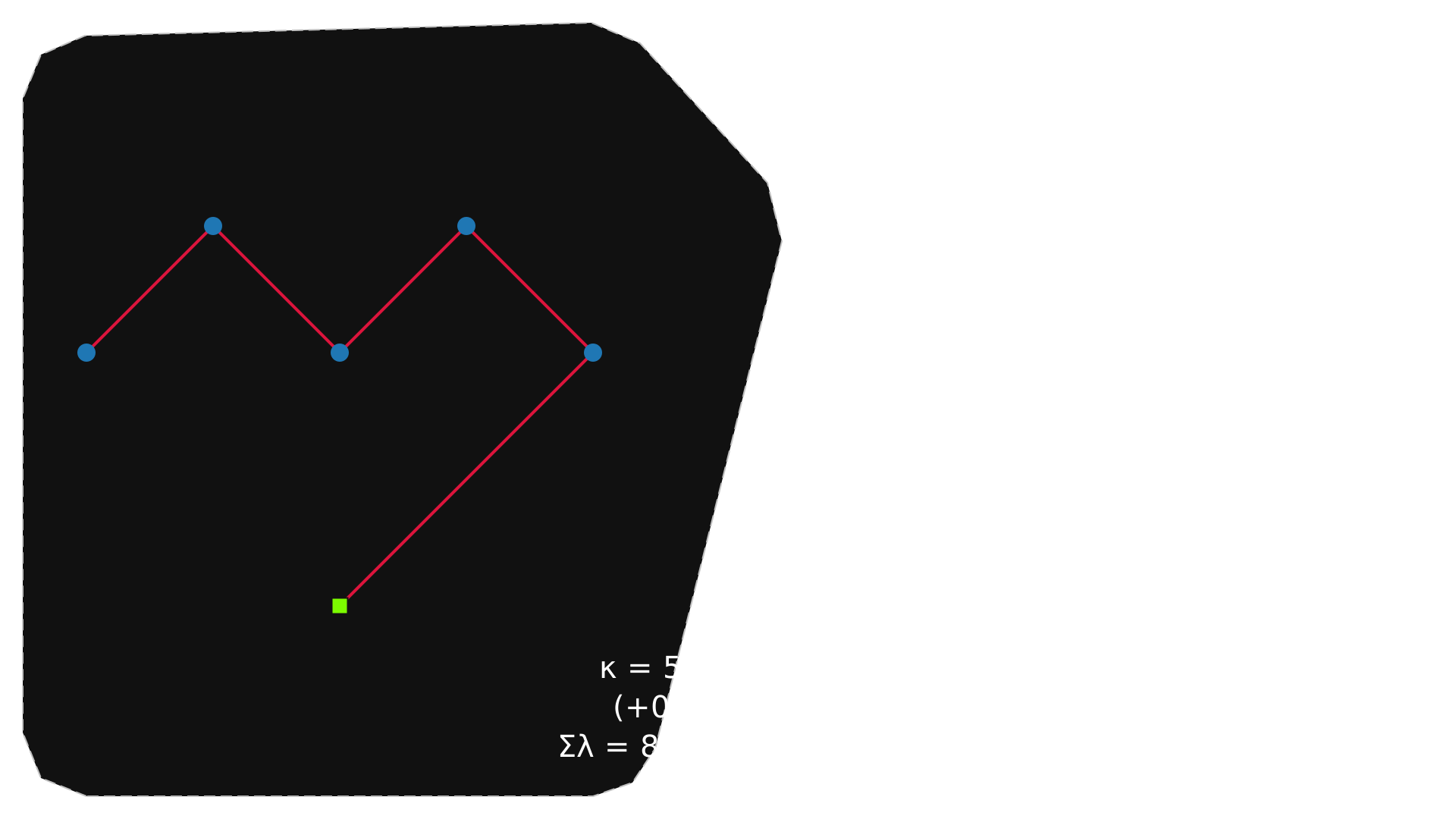
Method: add_buffer()
This method redefines the border and obstacles by expanding the borders and shrinking the obstacles; useful when turbines are near edges or when integrating with tools like TopFarm|
[14]:
wfn.add_buffer(buffer_dist=0.5)
Buffering by 0.50 completely removed the obstacle at index 0. For visual comparison use plot_original_vs_buffered().
[15]:
wfn.plot_original_vs_buffered()
[15]:
<Axes: title={'center': 'Original and Buffered Shapes'}>
[16]:
wfn.optimize()
wfn
[16]:
In this section:
we explored the most useful methods of the WindFarmNetwork class:
Method |
Purpose |
|---|---|
|
Run optimization with a router |
|
Visualize the network |
|
Get total cost and length |
|
Get compact link encoding |
|
Apply terse links manually |
|
Compute network’s gradient |
|
Export the optimized network data |
|
Expand border - Shrink obstacles |
For deeper insights into individual methods, refer to the dedicated notebooks provided.